Get This

Showing posts with label Stream New(Update). Show all posts

DotA 2 Patch 6.84 Released with 8 New Items!

DoTA 2 AWESOME Updates! Valve has just released the 6.84 Patch and it has 8 new items! I expect there will be a lot of balance updates but to have 8 new items is really caught me off guard! A lot of heroes also get Aghanim’s Scepter including Wraith King which will let allied hero become Wraith if they are death within 1200 range and it looks really fun!

Dota 2 Patch Notes (January 10, 2013) | Medusa Added!


This weeks patch adds an Radiant most awaited agility carry hero Medusa (also known as Gorgon in WC3 Dota and some random bug fixes/UI changes. Also, The Dota 2 guide section has been added on community. Looks like the update scene is back on track, hopefully we’ll be seeing Troll Warlord in game next week.

Dota 2 Patch Notes (1/10/2013):

GAMEPLAY
- Witch Doctor: Fixed Aghanim’s Death Ward attacking Familiars and other psuedo heroes.
- Doom: Scorched Earth now only applies damage from Doom himself, not all the units affected by his aura.
- Pudge: Fixed being able to get units stuck using Refresher.
- Keeper of the Light: Fixed Recall interaction with non-hero units.

UI
- Added a Haste button to the courier HUD element.
- Added Mid Only game mode for private lobbies (disables other lanes and allows the same hero to be selected).
- The Announcer Share dialog has been replaced with a Shared Content dialog.
- Added a badge to the top bar to count the available shared items.
- If shared content is available in a game, a message is now printed pregame.
- Added Balanced Shuffle button to non-tournament private lobbies.
- Added All Chat private lobby option for enabling voice chat among all players.
- Fixed “Equip” appearing in the right click menu for some chests.

AUDIO
- Fixed hearing the wrong announcer after equipping a new item in the loadout.
- Fixed bugs with muting cobroadcasters causing other sounds to be muted.

BOTS
- The bots are now less likely to push with more heroes than what they deem necessary (less 5-man Dota). Probably needs some tuning.
- Made bots slightly less self-concerned when considering defending an ally. Also made them more likely to jump in if they have a slow or stun.
- Bots that are capable of jungling during the laning phase may now do so.
- If purchasing an item from the secret shop would complete an item, desire for going there is now increased.
- When their next item is purchasable, their desire to farm is significantly reduced.
- Fixed bad tuning that was causing bots to almost never farm lanes.
- Improved bot responsiveness to pings on Roshan.
- Bots are now less likely to assume that humans will purchase wards.

Dota 2 Patch Notes (13 December, 2012) – Timbersaw Added!


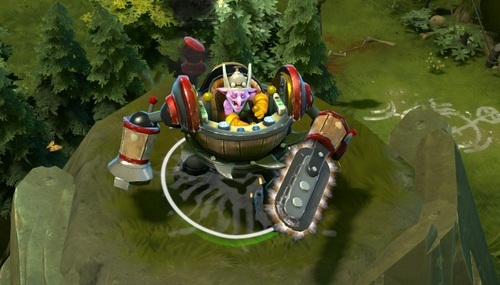
This update brings one of the most awaited strength hero, Timbersaw (Goblin Shredder in Dota). Timbersaw is a lumberjack of Dota with wood cutting abilities which deal great damage to enemy heroes. This week’s update also fixes some other miscellaneous bug fixes with other heroes.

Dota 2 Patch Notes:-

New:
Added Timbersaw! (Goblin Shredder)
GAMEPLAY
- Ancient Apparition: Fixed status effect ignoring magic immune units (HP Freeze and Shatter).
- Silencer: Fixed Last Word not being triggered by Invoke.
- Slark: Fixed Pounce leashing illusions.
- Undying: Fixed Decay providing too much healing to Undying.
- Fixed Shadow Blade interaction with Cleave and Critical Strike.
- Fixed Cycloning yourself causing you to take damage from Orchid.

Totaly Free Dota2 Steam Invite


We have DOTA2 invites available, drop in a comment telling us why you should be given the invite along with your email id, we will send you a gift invite.

VALVE is sending Dota2 invites GIFTS to users who already have beta keys so that they can invite their friends to the amazing world of Dota2. Whats more fun that playing with your buddies. If anyone of you don't have access to Dota2 better ask your friends again who play Dota2 or you could comment below and get invited.

DotA 2 Holloween Theme Map | DotA 2 Thorne


Valve has decided to change DotA 2 map for this Halloween fever. This week’s update from DotA 2 will bring a new theme with respect to the occasion which is coming in the end of this month. The trees, lanes, shops and creeps will be altered according to the Halloween theme. So have fun checking out this map.
Confirmed  Halloween date is  Wednesday, 31 October 2012. This theme will be added to DotA 2 before a week  from the Halloween. We hope that you guys will enjoy playing this map. So have fun and don’t forget to comeback here and check the latest updates of your favorite game.

Meet Icefrog in person during The International 2012

Any of you here curious about how the developer of the original DotA "Icefrog" actually looks like?

It hasn't been verified yet but in the video below, at minute 2:03 you can see the guy recording the video saying 'ICEFLOG'
But according to Tobi, in one of his streams, he said that is not the real Icefrog. So, who is the real ICEFROG? Was he even there during The International? Start the discussion!  Source  Dotatalk

How to open DOTA 2 International Treasure Chest


Valve has added a International Treasure Chest in DOTA 2 (21 August, 2012) update. This treasure chest is having 16 unique items which are divided into two categories. One is “Treasure of Champions” and the other is “Treasure of Challenger”. Both categories have equally 8 items in it. We are providing a guide to open this treasure box and items which are available in it.

How to Open DOTA 2 International Treasure Chest:

Step 1:
DOTA 2 International Treasure Chest is a hidden box which will be rewarded to you by playing DOTA 2.
Step 2:
You can open this missing chest by buying a KEY for it.
Step 3:
You can buy DOTA 2 missing chest key on the official DOTA 2 website.
Step 4:
Open the International Treasure chest and it will reward items from ” Treasure of Champions” or “Treasure of Challengers”. The images of these items are given below.

Treasure of Champions


 Treasure of Challengers

 
Note: You will need an International Treasure key to open this chest. You can pick one up at the DOTA 2 Store. This chest will disappear at the end of September 3rd, 2012 After the International DOTA 2 tournament.

Watch The International 2 Matches Without Beta key | DOTA 2 Spectator Client


DOTA 2 fans who are still waiting for beta key. DOTA 2 Spectator client is added in the steam which will allow you to watch “The International 2″ DOTA 2 tournament with out having a beta key. This feature is included just to entertain the fans from all around the globe. Below we have added a small guide to watch TI2 matches online.

How to watch The International 2 Match Online:

1. Download steam from here.
2. Create Login id.
3. Visit Dota 2 app page on Steam.
5. Install the Dota 2 Spectator client.
6. Enjoy, By using DOTA 2 Spectator client you can watch live matches, recent matches and list of the upcoming matches which are about to showcase.


The International DOTA 2 tournament is set to start from 31st August 2012. The matches will be available on steam client direct from Beyora Hall. The more updates related to spectator client will be added exclusively online here.

How to fix “Your map differs from the server” Dota 2

A lot of Dota 2 players are having a issues while spectating/watching live matches. Whenever you try to spectate a  game it gives “Your map differs from the server. Update your game.” error even though your Dota 2 client is fully updated and Steam doesn’t update it after restart. Don’t worry, there’s a small fix for this problem!

How to fix “Your map differs from the server” Dota 2:
Step 1:
• Go to “C:\Program Files\Steam\steamapps\common\dota 2 beta\dota\maps” directory. Delete everything in that folder.
• Go to Steam settings, Downloads + Cloud tab, change the download location to US – Seattle.

Step 2:
1. Launch Steam client and login your account.
2. Now go to the games library and right-click Dota 2, select properties.

3. Then, Go to Local Files tab, click “Verify integrity of game-cache”

4. Wait until the verification is done.

5. Once, it’s done, restart your Steam/Dota 2, it will start updating automatically.

Note: This fix will also work, if you are having graphic problems for e.g. Missing models, video artifacts etc.

Non-Game Software on Steam | What is Steam Greenlight?


For all these years, Steam has been dedicated to catering to the needs of a gamer and will continue to do so even in the future but it will not be limited to just gaming anymore. The platform will soon expand beyond gaming and host non-game software that many of the users of the platform are interested in.

Beginning September 5, 2012, Steam will play host to whole new set of software title ranging from creativity to productivity. All of these titles will make use of Steamworks’ features such as easy installation, automatic updates and the ability to save content to their personal space on the Steam Cloud.
Following the launch of these titles developers will be able to submit their software to the platform by publishing their content via Steam Greenlight.

“The 40 million gamers frequenting Steam are interested in more than playing games,”  said Mark Richardson, Steam App Store and Finance head at Valve. “They have told us they would like to have more of their software on Steam, so this expansion is in response to those customer requests.”

What is Steam Greenlight?

Steam Greenlight is a new system that enlists the community's help in picking some of the next games to be released on Steam. Developers post information, screenshots, and videos for their game and seek a critical mass of community support in order to get selected for distribution. Steam Greenlight also helps developers get feedback from potential customers and start creating an active community around their game as early in the development process as they like.
Rate games! You know you want to.

Why hasn't it always worked this way?

Over the many years that Steam has been selling games, the release rate of games on Steam has continued to grow significantly. But given Steam's existing technological pipeline for releasing games, there's always been a reliance on a group of people to make tough choices on which games to not release on Steam. There are titles that have tied up this internal greenlight group in the past, and we knew there had to be a better way.
With the introduction of the Steam Workshop in October 2011, we established a flexible system within Steam that organizes content and lets customers rate and leave feedback. This opened up a new opportunity to enlist the community's help as we grow Steam and, hopefully, increase the volume and quality of creative submissions.
We know there is still a lot of room for improvement in making Steam distribution easier and faster; this is just a first step in that direction.

How does this differ from other stores’ submission processes?

The prime difference is the size of the team that gets to decide what gets released. For many stores, there is a team that reviews entries and decides what gets past the gates. We're approaching this from a different angle: The community should be deciding what gets released. After all, it’s the community that will ultimately be the ones deciding which release they spend their money on.
For gamers

I know of a game that should be here. What do I do?

Go contact the game developer and suggest that they submit their game here for consideration.

There's a game on Greenlight that I really want to see succeed. What can I do?

Go tell your friends; just don't be annoying about it.

How do I report a fake/fraudulent/malicious game in Greenlight?

When you're looking at the page for a game in Greenlight, there is a 'Report' right next to the rating buttons, below the screenshots. Please report the item and tell us why you're doing so.
Good things get happy thumbs! Bad things get sad thumbs. Evil things get angry flag of doom!
For developers

How many votes does a game need to get selected?

It's going to change during the first few days/weeks since we don't know what kind of traffic to expect. Part of the drive for this system is the need for customers to help us prioritize which games they want to see made available on Steam. So the specific number of votes doesn't matter as much as relative interest in a game compared with other games in Steam Greenlight.
We're going to be reaching out to developers as we see their games getting traction regardless of whether they have achieved a specific number of votes or are sitting 1st or 2nd place at any given time. We are most interested in finding the games that people want, not requiring them to always hit a specific number of votes.

What if someone else has posted my game?

If your game has been posted by someone else and you wish for it to be taken down, please visit http://www.valvesoftware.com/legal.html and follow the instructions under 'Claims of Copyright Infringement'.

Can I post my game concept or early builds?

Absolutely! We encourage you to post information about your game as early in the development process as you are comfortable with. Greenlight will let you define whether you are posting your game as a concept/early build or as a playable game that is nearing completion.
We ask that you only define your game as 'playable game' if you have a playable build that demonstrates the gameplay mechanics and at least one level of your game. Otherwise, please classify your submission as 'concept' until its far enough along that the community can reasonably evaluate the mechanics, scope, and style of your game. Either way, you will probably get great feedback and a good start in building a community of fans around your game.

What systems must my game run on?

To remain in Steam Greenlight and qualify for distribution via Steam, your game must at least run on a Windows PC. You can be also developing for any other platform you like, but we are only able to support PC & Mac releases at this time.

Can I update my entry after I've submitted my game?

Please do! We encourage you to update your presence in Steam as often as you like to keep your fans and potential customers involved in your development process.

What happens when I submit my game?

As soon as you submit your game, it will start showing up for the community to review. Come back often to respond to community feedback, answer questions, or update your page with new developments or media.

What do I need in order to submit my game?

You'll need a valid and non-limited Steam account (yes, that means you'll need to own a game on Steam). Then, you'll need to fill out the submission form, including some information about you and your game. The submission will require:
  • A square branding image (similar to a box cover) to represent your game in lists and search
  • At least 1 video showing off your game or presenting your concept
  • At least 4 screenshots or images
  • A written description of the game along with tentative system requirements

What happens if my game never gets accepted?

Your game will remain on Greenlight unless you decide to take it down.

What if I don't want to announce my game early but I still want to be on Steam?

Once a game is accepted through Steam Greenlight, it doesn't take long to get it launched on Steam, so feel free to hold off on posting to Greenlight until you're ready to announce.

Are there any restrictions on what can be posted?

Your game must not contain offensive material or violate copyright or intellectual property rights.

When can I start using this?

Steam Greenlight is slated to launch at the end of August

Stay tuned for more updates!